Wednesday, August 10, 2011

Uni-ball Jetstream Stick Rollerball


With all the back to school items piled high in stores across the country, finding a pen that would be to your liking should be pretty easy. I saw these Uni-ball Jetstream 101 stick rollerball pens at a Shop Rite and was definitely interested. I love the spare design and length of stick pens like the BIC Stic and Paper Mate ballpoint stick pens. The pen just seems to feel, and look, better in my hand. And having a Jetstream option in a rollerball featuring their proprietary Super Ink was just perfect.


I was surprised to find out that the pen is refillable, although it has one of the longest refills I've ever seen. The plastic barrell is round with a beveled end so that it fits into the cap with a very satisfying click. No lost pen caps for this Jetstream.

At 1.0mm this Jetstream 101 has a very wide tip and is great for larger writing needs. If you're a teensy Rhodia or 3M sticky you may want to get a needle point rollerball instead. Although refills can obviously be in the size of your choice, and I'm thinking a Hi-Tec-C 0.5mm would fit just fine so I'll be trying that one out soon.

What about the ink? It's smooth, and the pen absolutely glides over the paper. I think this is one of the smoothest rollerball inks around, and it doesn't smear so fast writing is fine. Unfortunately my camera didn't feel like taking a picture of my writing sample, so you'll have to take my word on this.

Price is good, $3.89 plus tax for a 3 pack so you're not breaking the bank trying out this Jetstream. And as it is refillable, you can reuse the sticks with the refill ink and width of your choice. The Jetstream 101 is a lot of pen for the money, if you see them at your local back to school sale you might want to add a pack to your check-out.

Tuesday, August 9, 2011

The Occasional Rant

Sometimes you look at a situation and wonder "do these people know they are pointing that AK-47 at their own feet?" The Tea Party people make me ask that question.

(Which reminds me of another comment made some years ago by a foreign journalist about the New York Times' lengthy, agonized, and ultimately boring account of how they got the WMD/Iraq story wrong, and went something like "why do they shoot themselves in the b@lls?").

This Kevin Drum post from Mother Jones is an important read, as is the LA Times story he links to regarding the probable losers in the budget-cutting battle to come.

Another good map and discussion, from the Economist, really shows where the money comes from in the US and where it goes.

When the Tea Partiers and their friends stop cheering the US downgrade (and why S&P should be believed on anything, given their role in giving triple AAA ratings to asset backed securities and other questionable financial items), they may come to realize that the budget cuts are going to hurt them much worse. At which point they'll get angry at all those elites like Obama who took away their country, which they want back right now.

August Carnival Time


August always makes me think of the Great Allentown Fair, so I'm in the mood for a carnival. Peaceable Writer is hosting the August Carnival of Pen, Pencil and Paper and there are a lot of great posts so go take a look (especially the post on seven brown inks).

Monday, August 8, 2011

Noodler's Black Swan in Engish Roses

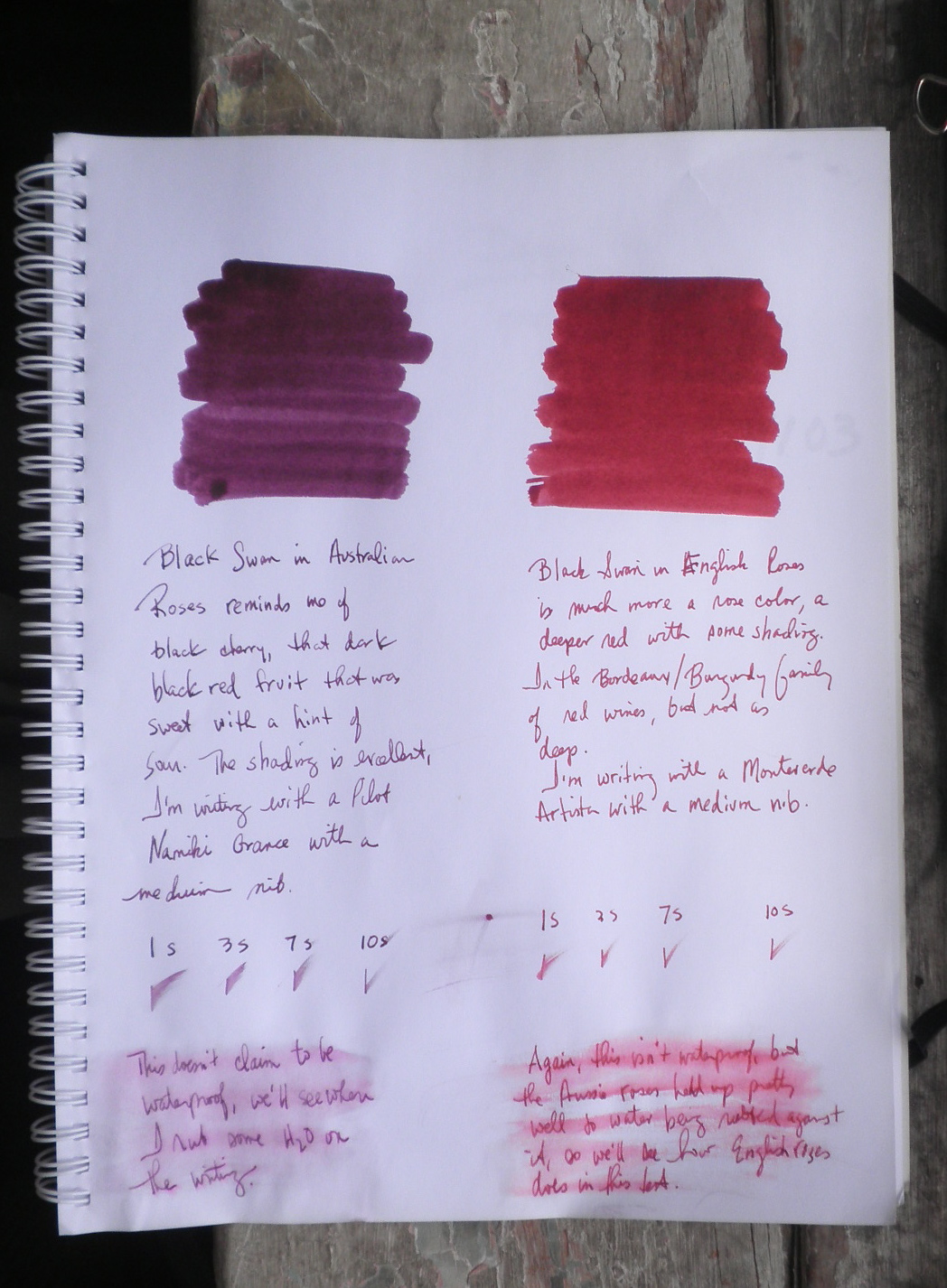
The second of the Black Swan inks is Black Swan in English Roses, which is much different from its Australian cousin (as you can see in the picture to the right that compares the two Swans).

English Roses is a deep, bright burgundy, reminding me of the wine inks of De Atramentis. It has more in common with a poppy than a rose (as Nathan Tardiff notes in his video). The ink's shading is beautiful but understated to my eye.

By contrast, Australian Roses is a black cherry color, and has a much heavier shading quality to the ink. It's a much darker color and doesn't have the brightness of English Roses.

Drying time is neither very quick nor very slow, just a regular Noodler's ink drying on the page. The paper I used isn't in the Rhodia/Clairefontaine category, but a bit better than copy paper.

The Roses inks aren't waterproof, but I was surprised at how well they held up when water was poured over them and then rubbed into the writing.

Definitely take a look at the video, the art work and explanations of the process behind the ink are always worth watching.

Thursday, August 4, 2011

Rhodia Bloc No. 120 Rainbow Notepad


I saw this Rhodia notepad in a post and was really taken with the rainbow colors of the paper, so naturally when I placed an order at Writer's Bloc I included a No. 120. I had seen the rainbow assortment in some wire bound Clairefontaine notebooks, but not in a Rhodia.


The No. 120 is larger than the No. 18, but is the same size as the No. 19 (8.25 by 12.5) that you can find in yellow lined paper or dotPad . There are 80 sheets of 80 gsm, 5x5m gridded paper in blue, bright yellow, pink, and mint green for you to choose from.


This is one cool design, and the larger paper makes it ideal for writing, doodling, notetaking, or whatever you usually do with A4 sized paper. You could keep notes segmented by color, and as the paper is three-hole punched you can add it to a binder.

I've noticed that when I don't quite know what use I'll make of something before I buy it I tend to find half a dozen uses after I've made the purchase. Inspiration is still coming to me, but I've started coming up with some plans for this that make it a necessary part of my daily arsenal. This may be the case for you, so definitely check out the Rhodia Bloc No. 120 rainbow notepad.

Wednesday, August 3, 2011

The Magical Appearing/Disappearing Uni-ball Jetstream


About two weeks ago I came into my office and found a Uni-ball Jetstream rubber body pen on my desk. What was unusual is that it wasn't mine, as I use other Jetstreams but not this one. I'd lucked out--instead of someone walking off with one of my (more upscale) pens, someone left one of her (more upscale) pens with me.

The Uni-ball Jetstream rubber body is a great looking pen and I started writing my notes and doodles with it. Smooth ink flow, didn't smear, nice barrel, the 0.7mm width not too wide, and the rubber coating that feels a bit softer in the hand.

Last night I decided I'd write a review of it for the blog, and get it officially on the #dailyarsenal list. I brought my digital camera in with me to take pictures, only to find...no pen. It was on my desk, now it's gone.

Perhaps it is a Quantum Jetstream, only in one place when you are focusing your attention on it. Or perhaps one of my co-workers left it on my desk a few weeks back, then saw it yesterday afternoon and took it back. Not a problem, but it does raise one question: who is coming into my office looking over my desk after I've left for the day?

Another post will be up shortly, but if you like gel ink pens and Jetstreams then try out this rubber body pen.

Monday, August 1, 2011

iTunes Moleskine App

The iTunes Moleskine app looks fantastic, just as if you had a Moleskine at your fingertips to write or draw in, like Hemingway or Monet or Klaatu the robot (maybe one of those--Monet?--didn't actually use a Moleskine, but that's not the point).

To start, you can change the color of the ribbon around the cover to match whichever type of Moleskine you want. This doesn't actually do anything other than making the app look more real and attractive, but that's quite all right. I chose yellow, but you can get red, orange, green, purple, or any of the other shades available.


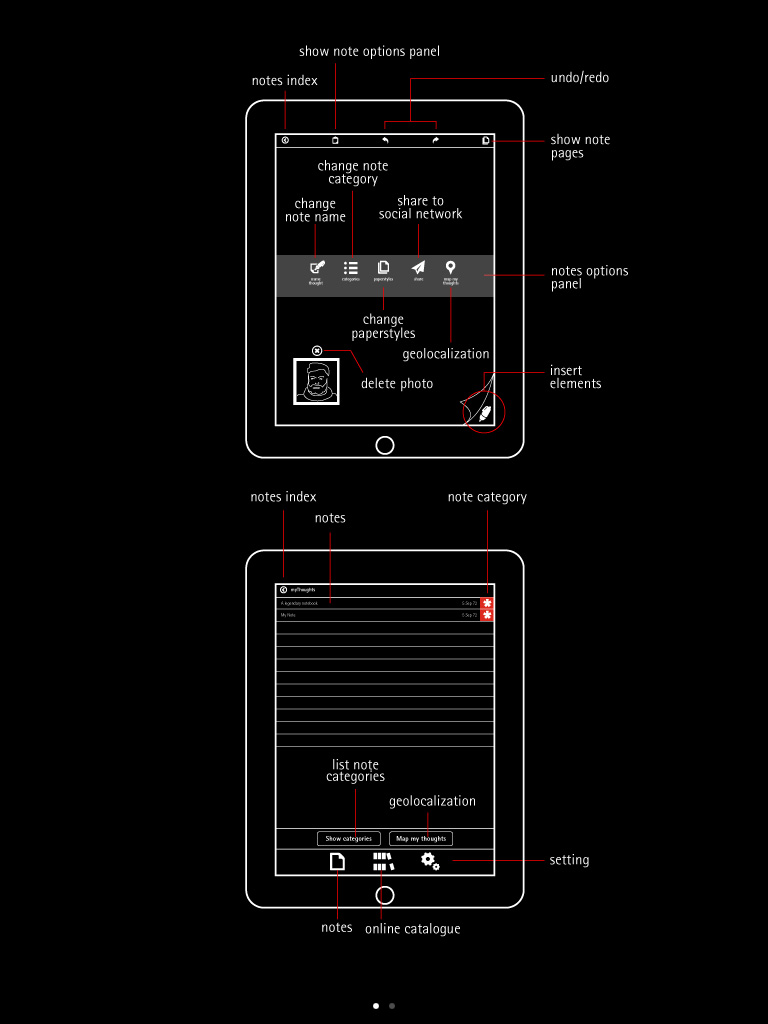
You start by creating a thought, which is dated and can be given a category (that's the asterisk icon on the right). This page seems to start out lined, but you can choose what type of paper you want to write on through the menu. And there are lots of menus!

This menu at the start of your throughs lets you choose Text, drawing, or adding a picture. The problem I had was that while I wanted Text to type in my thoughts, I couldn't get past the drawing part of the app. Something was wrong, so I went to the help section (which is the lighbulb on the top right of the pages).

Page one of the help info gives me all sorts of useful data, but how do I get to using Text?


Page 2 tells me how to turn Text on, so why isn't it working? Nowhere does Moleskine mention that if you tap twice on the iPad it will bring up the keyboard so you can type rather than write or draw your text. I found that out by accident, as I was absent-mindedly tapping on the app trying to figure out what was wrong.

Unfortunately, once I brought up Text I couldn't figure out how to switch back to the drawing part of the app, so I went into another menu to look.

This menu lets you choose the way your pages look, categories, and sharing your thoughts by emailing the page.


This is a view of how to change the4 paper, from grid to plain to lined. It's a deep ivory color, which I haven't found a way to lighten and don't thing you can.

When I was doodling around with the drawing app this message came up--if you want to write something (like you would in a Moleskine with a real pen rather than a capacitative instrument) this function mimics text to smooth out your writing or printing and make it legible. You have still written something, but now you can read it.

Here's the keyboard for Text writing, which I was glad to see. For people who would like to draw, there is a major problem in that the Moleskine app is portrait only. A landscape function would be great for artists and dabblers.


My handwriting on surfaces like this (such as the FedEx and UPS devices) isn't that great , although the smoothing-out function made it look better. One problem is that your hand rests on the iPad as you write, and so you can leave lines and squiggles on the page. Doesn't seem to have the hand-rest function I've seen on other notebook apps, where the screen basically becomes frozen so you don't pick up any extra lines.

The Moleskine app is beautifully designed and looks fantastic, just like a real Moleskine. But it is unwieldy (the reviews on iTunes are pretty brutal) and needs more work and better instructions. It's free, however, so if you're looking for a way to keep a Moleskine on your iPad and have a lot of time to figure out how it works (and the online instructions are no better than the ones show above) then you probably want to take a look at this.